Manage Product Reviews
The management of product reviews is made easy in AbleCommerce. We give you a separate management page where you can instantly see any new reviews that have been submitted.
Depending on your product review configurations, the product reviews submitted may need to go through an approval process before they are available for all users to see. This is the recommended practice, and we provide an interface specifically for merchants doing this task.
After reviewing each comment submitted, you can select one or more and approval. There are also options to disapprove or delete reviews submitted. As a merchant, you'll be able to easily see whether the reviewer is a verified user, and contact the reviewer, if needed.
See Configure Product Reviews and Product Review Settings for more information and configuration options.
Managing your Product Reviews
From the merchant administration, you can find all your store's product reviews by going to Manage > Product Reviews. This page will let you search on approval status, view the new reviews, edit if necessary (e.g. typos), and mark a review as "approved" so it will be published in your store.
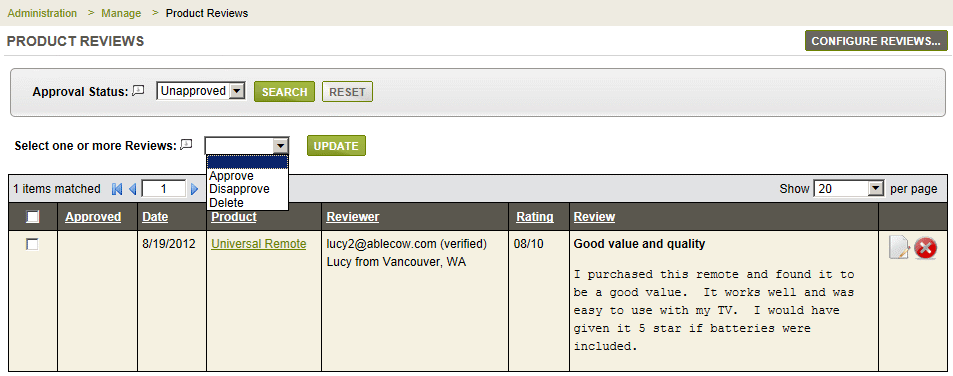
In the example above, notice that the reviewer's email is verified.
This means that the user had responded to the verification
email, and that this reviewer is now a "verified" user
in the system.
By default, the Approval Status search form will show all the Unapproved reviews. These are the reviews that need interaction by the merchant.
To Approve or Deny a Product Review:
In the top search form, make sure the Approval Status is set to 'Unapproved' and click the Search button.
Any results will be shown in the grid below.
Using the checkbox, in the left most column, select one or more product reviews.
Then make your selection to Approve, Disapprove, or even Delete.
Click the UPDATE button to apply this action to all records.
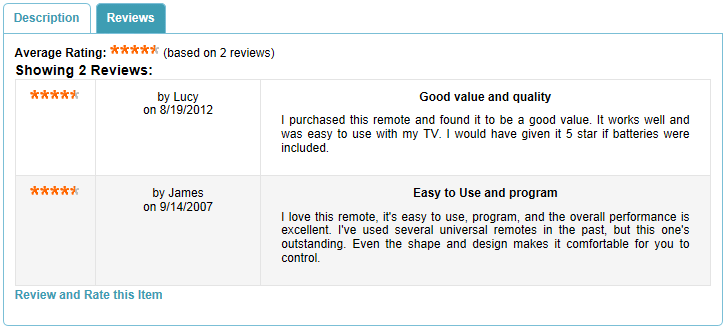
Some published product reviews examples are shown below.