Effective 6/01/09, the AbleCommerce 7.0.3 release will install by default to the 3.5 version of the .Net Framework. If you would like to install AbleCommerce 7.0.3, or any higher version, to the .NET Framework version 2.0, you must complete the steps below first.
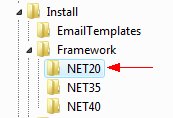
The files necessary for installing to the .NET 2.0 Framework are listed below. These can be found in your original software download. They are located in the \Install\Framework\NET20\ folder.
Location of .Net 2.0 Files
Files specific to .Net 2.0
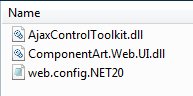
These 3 files will need to be copied into the applicable locations as indicated in the instructions below.
\Install\Framework\NET20\web.config.NET20
\Install\Framework\NET20\ComponentArt.Web.UI.DLL
\Install\Framework\NET20\AjaxControlToolkit.DLL
To install AbleCommerce 7.0.3+ on the .Net Framework 2.0, you will need to complete the instructions below before installing:
rename the original ..\web.config to ..\web_NET35.config
locate the web.config.NET20 file in the ..\Install\Framework\NET20\ folder and copy it to the root folder
rename ..\web.config.NET20 file to ..\web.config
locate the ComponentArt.Web.UI.DLL file in the ..\Install\Framework\NET20\ folder and copy it to the ..\bin\ folder
locate the AjaxControlToolkit.DLL file in the ..\Install\Framework\NET20\ folder and copy it to the ..\bin\ folder
Return to the Installation Guide, Step 1: Run the web-based installer.
Copyright © 1996 - 2026 AbleCommerce.com, All rights Reserved
eCommerce software platform built by AbleCommerce